TABLE OF CONTENTS
- What is Categorizing your POIs?
- Examples of Use Cases for Categorizing POIs
- How Categorization Works in the App
- Get Started: Categorizing your POIs
Categorizing your Points of Interest (POIs) within Driftscape is vital for enhancing user experiences and boosting content discoverability. By assigning categories, you enable visitors to effortlessly filter their app view and explore specific areas of interest, whether they are seeking historic landmarks, local events, or curiosities in your region. This strategic approach helps improve engagement and ensures your content is easier to discover within the Driftscape app.
What is Categorizing your POIs?
Categorizing your POIs allows Driftscape users to filter and explore content based on their interests. Users can sort their view by category, making it easier to find relevant experiences within the app.
Categorization can be applied to any type of POI including:
Places
Events
Tours
All POIs should be assigned at least one category. It is recommended to assign no more than two categories per POI.
Examples of Use Cases for Categorizing POIs
Use Case 1: Helping Users Discover Relevant Content
Categories allow visitors to quickly filter content and discover POIs related to their interests such as art, history, food, or shopping.
Use Case 2: Improving Navigation in the App
When categories are properly assigned, users can easily toggle categories on or off to see only the POIs that match their interests.
Use Case 3: Organizing Large Collections of Content
Organizations with many POIs can use categories to group similar content together, making it easier for users to browse and explore.
How Categorization Works in the App
Users can select what they want to see from the menu icon in the lower right corner of the app.
By turning categories on or off, users will only see POIs that match their selected categories. For example, if a user selects the Art category, only POIs assigned to that category will appear in their view.


How To Categorize Your POIs Tutorial Video
Get Started: Categorizing your POIs
Step 1: Select the POI to Categorize
Log into the Driftscape CMS at: cms.driftscape.com
Use your username and password credentials provided by your Driftscape representative. If you require help logging in or resetting your credentials, contact your Driftscape representative.
Once logged in:
Navigate to the Organization Content list.
Select the Organization name that contains the POI you want to categorize.
You can access the POIs associated with that organization by:
Clicking the organization name, or
Clicking the icon under the Content column.
Step 2: Assign Categories for your POI
Once inside the organization:
You will see a list of POIs belonging to that organization.
Click the pencil icon under the Edit column for the POI you want to modify.
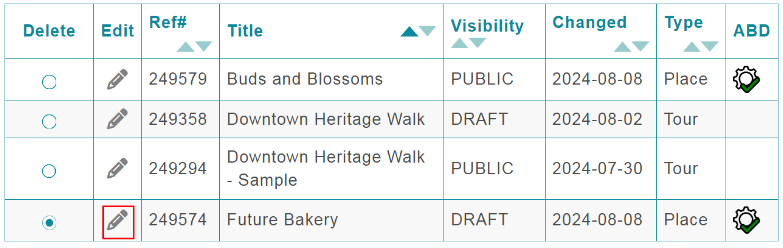
Scroll down in the POI editor until you reach the Categories section.
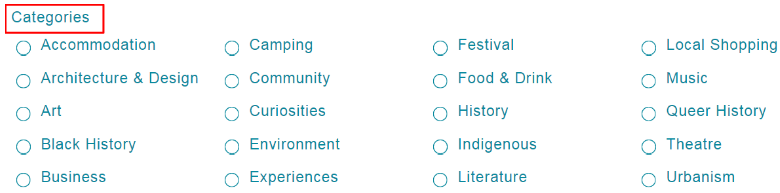
Select the category or categories that best match your POI.
A POI for Future Bakery could be categorized as:
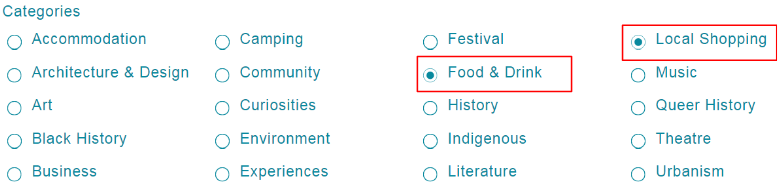
Although multiple categories can be selected, it is recommended to assign no more than two categories per POI.
Step 3: Save the Changes
After selecting the appropriate categories scroll to the bottom.
This will save the category selections and apply them to your POI.
Was this article helpful?
That’s Great!
Thank you for your feedback
Sorry! We couldn't be helpful
Thank you for your feedback
Feedback sent
We appreciate your effort and will try to fix the article